Download your latest statement from your bank's official app, go through every line, and look for six warning signs: a name you don't know, the same charge twice, tiny charges, a subscription you forgot, a transfer to a stranger, and a foreign charge when you weren't abroad. If a transaction isn't yours, call your bank's 24-hour fraud hotline or the National Scam Response Centre on 997 straight away, then make a police report.
Why check now
Three stories in the past two weeks have people asking whether their money is safe:
- Bank Rakyat (6 November). Its websites, including the iRakyat login page, were defaced and taken offline. The bank said deposits, personal details and banking records were safe (Lowyat.NET), and the communications minister said there was no data theft (Malay Mail).
- Crédit Mutuel Arkéa, France (disclosed 4 November). Attackers got in through a service provider and moved money out of the bank's own account. A blockchain investigator estimated up to €118 million (about US$133 million); the bank has confirmed only the order of magnitude, and says customer accounts were not affected (BleepingComputer).
- Binance (29 October). About US$6.3 billion in client assets was affected, reported as the largest crypto theft on record (CNBC). Part of it was later frozen (Axios), and Binance said it would make affected users whole, so the final loss is lower than the headline figure.
The three cases are different, and none of them means your own account was broken into. For most people the more likely problem is smaller and closer to home: a card number stolen at an online shop, a phishing link, or a subscription that never stopped. Those show up on your statement first, if you look.
6 warning signs on a bank statement
| Warning sign | What it can look like | Check first |
|---|---|---|
| A name you don't know | "PAYPAL *" plus a code, or a company name instead of the shop name | Search the name. Many shops bill under a parent company or payment provider |
| The same charge twice | RM89.00 to the same shop twice within a day or two | Look at your receipt or order history. One may be a pending hold that drops off |
| Tiny charges | RM1.00 or RM2.50 from a shop you never used | Take it seriously. A small charge can be a test that a stolen card works |
| A subscription you forgot | RM9.90 every month for a trial you thought you cancelled | Cancel it where you signed up. Ask your bank if it keeps charging |
| A transfer to a stranger | DuitNow or IBG transfer to a name you don't know | Call your bank at once. Transfers are hard to reverse |
| A foreign currency charge | A USD or EUR charge when you weren't abroad | Check shops that bill from overseas. If none fit, report it |
How to check a statement by hand
- Get the statement from the official source: your bank's app or website. Never open one from a link in an SMS, WhatsApp message or email. That is how phishing works.
- Check the balance first. Does this month's opening balance match last month's closing balance?
- Go line by line. Tick each one against a receipt, your e-wallet history or an order confirmation.
- Mark anything you can't place, then search the merchant name before you worry.
- Look at small amounts and foreign currency lines on purpose. They are the easiest to skip.
- Do the same for every account: credit cards, e-wallets and the old savings account you rarely open.
- Write down what to ask your bank, with the date and amount of each line.
The easier way: let SnapBill read the statement
A statement with a hundred lines is tiring to check by eye. SnapBill turns it into a list you can sort, search and review. It doesn't connect to your bank: you upload a statement file you downloaded yourself, so SnapBill never sees your online banking password.
- Upload a PDF, CSV or Excel statement. Password-protected PDFs work too.
- SnapBill uses AI to pull out the transactions, so you see dates, descriptions and amounts in one list. If they add up to the statement's opening and closing balances, they are saved; if not, SnapBill asks you to review them first. The original file is kept, so you can open it and compare. AI can occasionally miss or misread a line, especially on scanned pages.
- Each transaction gets a category, such as food and dining, transportation, utilities, transfers or fees. Change any that look wrong, and search the list by name.
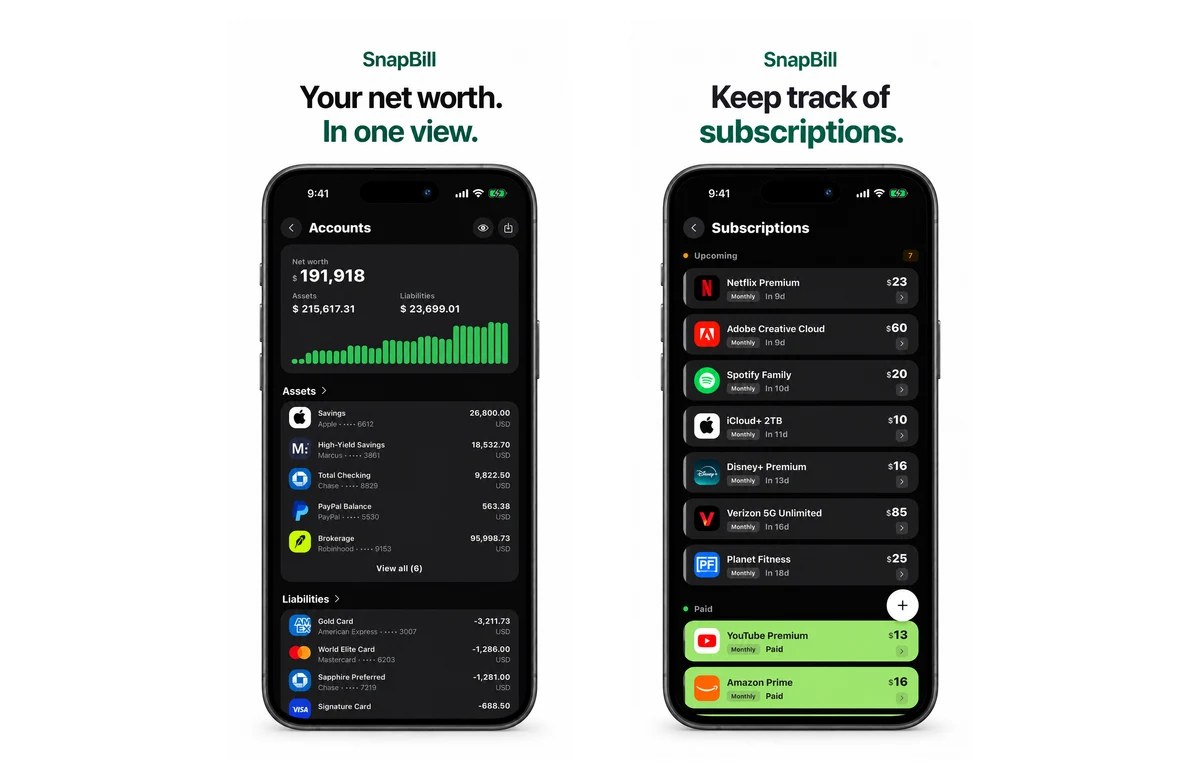
- Recurring payments are grouped for you: what repeats, how often and when it last charged. A forgotten RM9.90 plan is easy to spot here, and you can add it to your subscriptions in one tap.
- See the trend: money in and money out, month by month, so a month that looks different stands out.
- Match receipts to bank lines. Your scanned receipts are linked to their transactions, so you can see which payments you have proof for (more on this in tracking expenses without a bookkeeper).
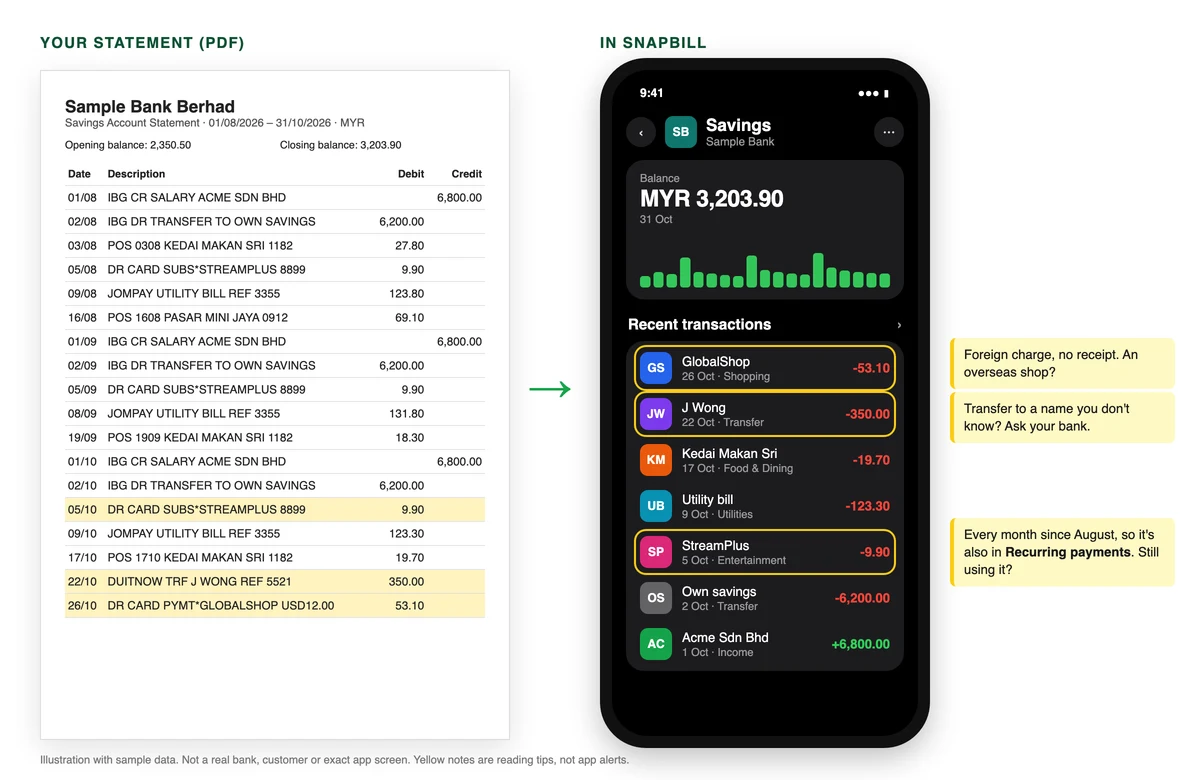
Example: five statement lines, before and after
| On the statement | Amount (RM) | In SnapBill | Worth a look? |
|---|---|---|---|
| IBG CR SALARY ACME SDN BHD | +6,800.00 | Acme Sdn Bhd · Income | No, your salary |
| POS 1710 KEDAI MAKAN SRI 1182 | −19.70 | Kedai Makan Sri · Food & Dining | No, matches a receipt |
| DR CARD SUBS*STREAMPLUS 8899 | −9.90 | StreamPlus · Entertainment · in Recurring payments | Yes: do you still use it? |
| DUITNOW TRF J WONG REF 5521 | −350.00 | J Wong · Transfer | Yes: do you know this person? |
| DR CARD PYMT*GLOBALSHOP USD12.00 | −53.10 | GlobalShop · Shopping | Yes: foreign charge, no receipt |
Checking by hand vs with SnapBill
| By hand (PDF) | With SnapBill | |
|---|---|---|
| Find a merchant | Scroll and read every page | Search the list by name |
| Spot repeat charges | Remember last month's statement | Recurring payments grouped for you |
| See where money went | Add it up yourself | Categories and a monthly in-and-out trend |
| Proof of payment | Receipts kept somewhere else | Receipts matched to bank lines |
| Several banks and cards | One PDF at a time | All accounts in one place |
| Deciding what is fraud | You | Still you: SnapBill does not flag fraud |
| Cost | Free | 1 credit per 10 pages |
Statement import is part of every SnapBill plan, including the free one. Each import uses one credit per 10 pages, so a 3-page statement costs 1 credit, and a failed import is never charged. See pricing and the FAQ for details. On a computer? Sign in at app.snapbill.tech and upload your statement there.
Upload last month's statement and see each transaction with a category, repeat charges grouped, and your receipts matched. No bank login needed. Import a statement free
What to do if a transaction isn't yours
- Call your bank first. Use the 24-hour fraud hotline on the back of your card or in the official app, never a number from an SMS or a search ad. Ask them to block the card or account.
- Use the kill switch if your bank has one. Most Malaysian banks let you freeze your account or online banking from the app or the hotline (Lowyat.NET).
- Call 997, the National Scam Response Centre, if money was transferred out. Call as soon as you can, ideally within 24 hours (Bank Negara Malaysia), and still report it if more time has passed. The line has run 24 hours a day since March 2026 (The Star); some older pages still say 8am to 8pm.
- Make a police report at the nearest police station. Call the bank or 997 first so you don't lose time.
- Keep the evidence: the statement, screenshots, SMS alerts and any messages with the scammer.
- Never share your OTP, TAC, PIN or password, even with someone who says they are from the bank, the police or the NSRC. The NSRC only takes calls from the public and doesn't call you (NFCC).
Refunds are not automatic. Banks investigate each case, and Bank Negara expects fair redress for customers who took the necessary precautions (BNM).
Make it a monthly habit
Pick one day a month, such as the day after payday or when your card statement arrives, and check every account. Turn on SMS or app alerts for each transaction to catch problems in between. Keep the statements too: they double as proof of payment, and LHDN can ask for records for up to seven years (see how long to keep receipts in Malaysia).
Quick answers
Can AI detect unauthorised bank transactions?
Banks run their own fraud monitoring. Apps like SnapBill organise your transactions so you can review them faster, but they don't decide what is fraud. You are the one who knows which payments you made.
Is my money safe after the Bank Rakyat incident?
The bank and the government said the 6 November incident was a website defacement, with no customer data or money taken. Follow updates on the bank's official channels, and ignore any message asking you to "verify" your account.
What number do I call for bank fraud in Malaysia?
Your bank's 24-hour fraud hotline first, or the National Scam Response Centre on 997. Then make a police report.
How often should I check my bank statement?
At least once a month, with transaction alerts turned on in between. Check credit cards and e-wallets as well as your main account.
Does SnapBill need my bank login?
No. You upload a statement file you downloaded yourself. SnapBill never asks for your online banking username or password.
Can SnapBill read Maybank, CIMB, Public Bank or RHB statements?
SnapBill users have already imported statements from all four. SnapBill isn't limited to a list of banks: it reads the file itself, so results depend on the file. PDFs downloaded from your bank, CSV and Excel files read best; scanned or photographed pages are harder. Check the imported list against the original, and have it re-read if lines are missing.
Disclaimer: This article is general information, not financial or legal advice. Hotline hours and bank procedures change; check with your bank and the National Scam Response Centre for the latest. News facts checked on 8 November 2026.