Start with what you need to do. These five apps overlap, but each is designed around a different workflow.
- Expensify · Company expensesSubmit receipts, manage approvals and reimburse employees.
- Dext · BookkeepingSend receipts and documents into your accounting software.
- Spendee · Household budgetsTrack shared spending and connect supported banks on Premium.
- Money Manager · Manual trackingRecord expenses yourself with a free, ad-supported budget app.
- SnapBill · Detailed receipt scanningCapture line items and track spending with pay-as-you-go credits.
Two kinds of apps
Expensify and Dext are business expense apps. They read receipts and move them into a company's approval or accounting system. Spendee and Money Manager are budget apps. They help you see where your money goes each month. SnapBill sits between the two: it reads receipts in detail like an expense app, and adds budgets and insights like a budget app.
At a glance
| Feature | SnapBill | Expensify | Dext | Spendee | Money Manager |
|---|---|---|---|---|---|
| Best for | Individuals & small businesses | Business teams | Accountants & businesses | Household budgets | Manual budgeting |
| Pricing | Pay per scan | Free personal; paid teams | Subscription | Free + paid plans | Free with ads |
| Receipt OCR | Item-level OCR | SmartScan | OCR; item limits apply | Premium: total & category | No OCR; photo attachments |
| Bank connection | Statement import only | Company cards | Bank feeds | Premium bank sync | Manual entry |
| Budgets | Yes | Not a budget app | No | Yes | Yes |
| Team approvals | No | Yes | Expense claims | No | No |
| Accounting sync | No direct sync | QuickBooks, Xero + more | Xero, QuickBooks, Sage + more | No direct sync | No direct sync |
| File exports | CSV, Excel & PDF | CSV | Not compared | CSV & XLS | Excel |
Full feature details and limitations
SnapBill
- Built for
- Individuals, freelancers, small businesses
- Price
- Pay per scan. 10 free credits, then packs from RM9.90 for 100
- Reads receipts
- Yes, every item, price and tax line
- Bank connection
- No. Import bank or card statements
- Budgets
- Yes
- Team approvals
- No
- Accounting sync
- No. Export CSV, Excel, PDF
- Platforms
- iPhone, Android, web
Expensify
- Built for
- Companies and teams
- Price
- Free personal account. Collect US$5 per member a month
- Reads receipts
- Yes (SmartScan)
- Bank connection
- Company cards
- Budgets
- Not a budget app
- Team approvals
- Yes
- Accounting sync
- QuickBooks, Xero and more
- Platforms
- iPhone, Android, web, desktop
Dext
- Built for
- Accountants, bookkeepers, small businesses
- Price
- US$25.21 a month billed yearly (US$302.50), or US$31.50 monthly
- Reads receipts
- Yes. Line items: 5 a month, then extra
- Bank connection
- Bank feeds
- Budgets
- None
- Team approvals
- Yes, expense claims
- Accounting sync
- Xero, QuickBooks, Sage and 30+ more
- Platforms
- iPhone, Android, web
Spendee
- Built for
- Personal and household budgets
- Price
- Free plan. Plus US$1.99, Premium US$5.99 a month
- Reads receipts
- Premium only, fills in the total and category
- Bank connection
- Premium only, 2,500+ banks
- Budgets
- Yes
- Team approvals
- No
- Accounting sync
- No. Export CSV, XLS
- Platforms
- iPhone, Android
Money Manager
- Built for
- Personal budgets, by hand
- Price
- Free with ads. Ad-free iPhone app US$5.99 once
- Reads receipts
- No. Attach up to 3 photos
- Bank connection
- No. Manual entry
- Budgets
- Yes
- Team approvals
- No
- Accounting sync
- No. Export Excel
- Platforms
- Android, iPhone, iPad
Prices are US list prices unless noted. Spendee says its prices can differ by country.
Expensify: best for company expense reports
Where it wins. Employees snap receipts, managers approve them, and finance reimburses and syncs to the accounting system. The free personal account has unlimited SmartScans and CSV export.
Watch out for. Categories, tags, approvals and integrations need a paid workspace, priced per member each month (Expensify pricing). Compare more in SnapBill vs Expensify.
Dext: best for bookkeepers and accounting software
Where it wins. Dext syncs with 36+ accounting platforms, including Xero, QuickBooks and Sage (Dext integrations). One Business plan covers 5 users and 250 documents a month, with expense claims and approvals (Dext plans). Your accountant may already use it.
Watch out for. No free plan, only a 14-day trial. Line items are included for 5 documents a month, then cost extra from US$0.50 each (Dext line-item pricing). Prices are in US dollars, and there are no budgets: it's built for bookkeeping.
Spendee: best for a household budget with bank sync
Where it wins. A polished budget app. Premium links 2,500+ banks and e-wallets in about 50 countries, including Malaysia, Singapore, the UK and the US (Spendee bank connect). Shared wallets suit couples and flatmates, and only the owner pays. Premium is US$35.99 a year (Spendee pricing).
Watch out for. Bank sync, auto-categories and receipt scanning are Premium only. The AI scan fills in the price and category; Spendee doesn't say it records each item. No PDF export, and it isn't built for business records.
Money Manager: best free app for manual tracking
Where it wins. Free, with 10M+ downloads and a 4.6 rating on Google Play. It has double-entry bookkeeping, credit card balances, budgets and multiple currencies. The ad-free iPhone app is a one-time US$5.99.
Watch out for. Everything is typed by hand: no bank connection and no receipt reading, only up to 3 photos per entry. Those photos are left out of its backups and deleted with the app, so don't keep tax receipts only there. Exchange rates are manual.
SnapBill: best for reading every line of a receipt
Where it wins. SnapBill keeps each item, quantity and price as its own line, plus tax, service charge, discounts and rounding. Scan up to 20 receipts at once in 150+ currencies. Budgets, insights, business and personal ledgers and bill splitting are included, and credits never expire. See why line items matter.
Watch out for. No live bank connection (you import PDF statements), no accounting-software sync (export CSV, Excel or PDF), no team approvals and no desktop app. You pay per scan; outside Malaysia, at your local store price.
Which is better for you?
| Your need | Best pick | Why it fits |
|---|---|---|
| Run company expense reports | Expensify For teams | Approvals and employee reimbursements. |
| Send receipts to accounting software | Dext For bookkeeping | Connects to Xero, QuickBooks and Sage. |
| Budget with your household | Spendee For households | Budgets and shared wallets. |
| Track spending manually for free | Money Manager For manual entry | Manual tracking on its ad-supported plan. |
| Capture receipt line items | SnapBill For receipt detail | Item-level scanning with pay-as-you-go credits. |
Who should choose which app?
Start with your main task: team reimbursements, bookkeeping, household budgets, manual tracking or receipt detail. The labels above describe fit, not an overall ranking. Check the plan limits and trade-offs in each app’s section before choosing.
What a year costs: one example
Assumptions: one person, about 30 receipts a month, for 12 months, US list prices on 24 October 2026.
| App & best fit | Plan / approach | Cost for 12 months |
|---|---|---|
| Money Manager Free manual tracking | Free, with adsManual entry; no scanning. | US$0Free plan |
| Expensify Free receipt capture | Free personal accountReceipt scans and CSV export. | US$0Free personal plan |
| Spendee Household budgeting | PremiumBank sync and AI scan. | US$35.99Billed yearly |
| Expensify Team expenses | CollectCategories and accounting sync. | US$60US$5 per member / month |
| Dext Bookkeeping | BusinessBookkeeping workflow. | US$302.50Billed yearly; line items beyond 5 documents / month cost extra. |
| SnapBill No subscription | Pay as you go10 free credits to start. | Usage-basedFrom RM9.90 / 100 credits in Malaysia. Annual cost varies. |
Choose the workflow first, then compare its cost. Free plans may cover manual tracking or basic scanning. Spendee Premium adds bank sync; SnapBill uses scan credits; Dext is priced for a broader bookkeeping workflow. These plans are not feature-equivalent, and local prices may vary.
See SnapBill on your own receipts
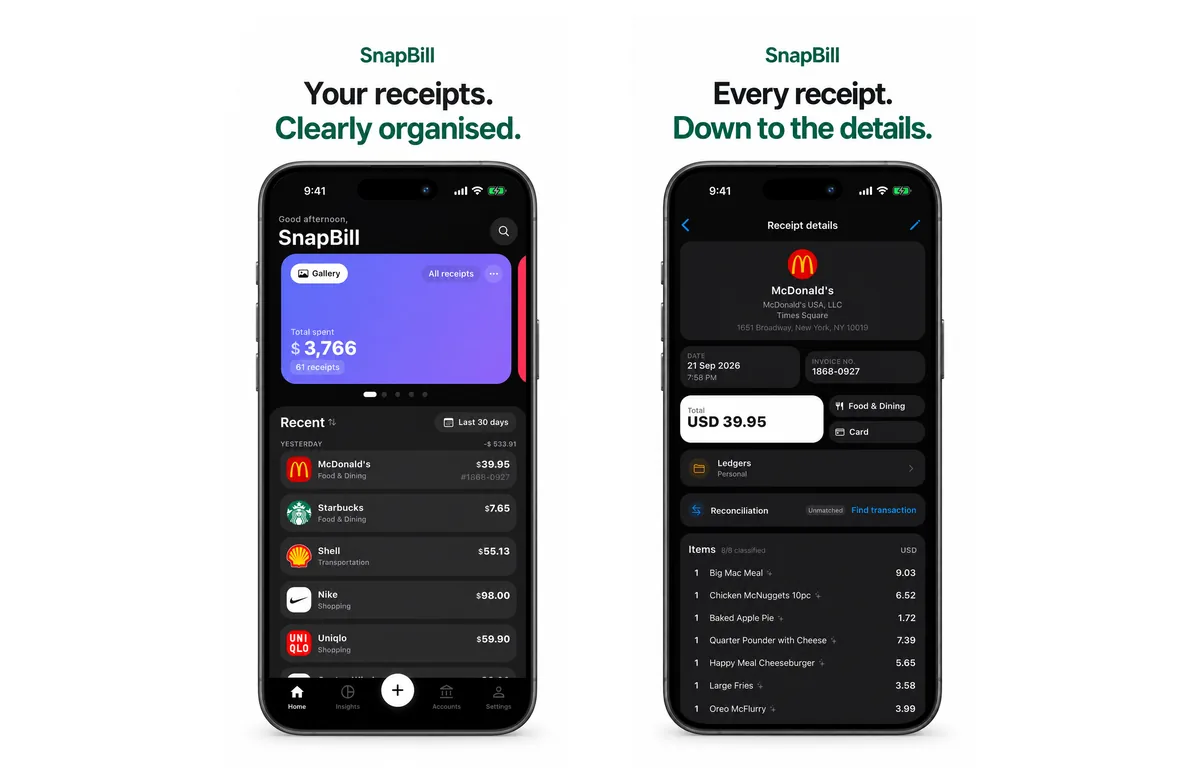
SnapBill reads every line on your receipts, sorts them into categories and keeps the image safe in your account. Start with 10 free credits on iPhone, Android or the web. Download SnapBill
Freelancers can see how it works as an expense tracker for freelancers. For receipt scanners only, read the best AI receipt scanner apps in 2026.
Quick answers
Which is better, Spendee or Money Manager?
Spendee if you want bank sync and a shared household budget, on its Premium plan. Money Manager if you want a free app and don't mind entering each expense by hand.
Can Money Manager scan receipts?
No. You can attach up to 3 photos to each entry, but it doesn't read them, and the photos are left out of its backups.
Does Spendee scan receipts?
Yes, on Premium. Its Magic AI Scan fills in a transaction's price and category from a photo.
Is Dext worth it for one person?
Usually not. Dext is priced for businesses and accountants, from US$25.21 a month billed yearly, with no free plan. It makes sense if your accountant already uses it.
Which app reads every line item on a receipt?
SnapBill reads every item on every scan. Dext reads line items too, but includes only 5 documents a month before you pay extra. Expensify says SmartScan extracts itemised lines.
Which app is free?
Money Manager (with ads), Spendee's Basic plan (1 wallet, 1 budget) and Expensify's personal account are free. SnapBill gives 10 free credits, then you buy packs.
Disclaimer: Written by the SnapBill team. SnapBill is our product. Competitor prices and features were checked on each company's own website on 24 October 2026 and may change, and prices can differ by country. Expensify, Dext, Spendee and Money Manager are trademarks of their owners. SnapBill is not affiliated with or endorsed by any of them.