If you run expense reports for a company, with approvals, reimbursements and a company card, pick Expensify. That is what it is built for. If you are one person or a small business and want every line of every receipt read and sorted, without a monthly subscription, pick SnapBill. And if you only need to snap receipts and export a CSV, Expensify's free personal account may be all you need.
Here is how the two compare, with prices checked on 20 October 2026.
SnapBill is our product. We have tried to be fair, and we say plainly where Expensify is the better choice.
SnapBill vs Expensify at a glance
| SnapBill | Expensify | |
|---|---|---|
| Price model | Pay as you go. Buy credit packs; 1 receipt scan = 1 credit. No subscription. | Monthly subscription per person. Collect: US$5 per member. Control: US$36 per active member, or US$18 on an annual plan (less with the Expensify Card). |
| Free tier | 10 free credits when you sign up. Every feature is on every account. | Free personal account with unlimited SmartScans, manual entry, mileage and CSV export. Categories, tags, approvals, integrations and the card need a paid workspace. |
| Line-item extraction | Reads every item, quantity and price, plus tax (VAT, GST, SST), service charge, discounts and rounding, and keeps them as separate lines. | SmartScan reads the merchant, date and amount, and Expensify says it also extracts itemised line items. To turn one receipt into several expenses, you split it yourself. |
| Multi-currency | 150+ currencies, with automatic conversion. | Yes. Expenses in other currencies, with totals converted to one currency. |
| Team approvals | No. SnapBill is for your own records. | Yes. Approvals on Collect; multi-level approvals on Control. |
| Corporate card | No. | Yes, the Expensify Card, for companies registered in the US, UK and 12 European countries. |
| Integrations | No direct accounting sync. Export to CSV, Excel or PDF; developer API. | QuickBooks Online and Xero on Collect. NetSuite, Sage Intacct and HR/payroll tools on Control. |
| Platforms | iPhone, Android and the web. | iPhone, Android, the web, and Mac and Windows desktop apps. |
| Best for | Individuals, freelancers, households and small businesses who want item-level detail and no subscription. | Companies and teams that need expense reports, approvals, reimbursements and a company card. |
Who each app is for
Expensify is built for companies. Its paid plans are priced per member, and its main features are about moving money inside a business: employees submit expenses, managers approve them, finance reimburses them and syncs everything to the accounting system. If that is your day, Expensify has had years to get it right.
SnapBill is built for your own records. You scan a receipt and SnapBill reads the whole thing: each item, the quantity, the price, the tax and any service charge or discount. It sorts your spending into categories and ledgers, so you can keep business and personal spending apart. It suits freelancers, sole traders, small business owners and households who keep receipts for tax records (IRS, HMRC, ATO, LHDN and others) or for a budget.
Pricing compared
The two apps charge in different ways. Expensify charges per person per month. SnapBill charges per scan, and credits you buy never expire.
Expensify plans (US prices, checked 20 October 2026):
- Free personal account: unlimited SmartScans, manual entry, mileage tracking and CSV export. No categories, tags, approvals or accounting integrations.
- Collect: US$5 per member per month, no annual commitment. Also £5, €5, AU$8 or NZ$9 in those regions. Adds approvals, reimbursement, the Expensify Card, and QuickBooks Online and Xero.
- Control: US$36 per active member per month, or US$18 per member on an annual plan. Using the Expensify Card can cut this by up to half, to as low as US$9. Adds multi-level approvals, ERP and HR integrations, and single sign-on.
SnapBill credit packs (Malaysia prices):
- 10 free credits for every new account.
- Lite: RM9.90 for 100 credits.
- Plus: RM19.90 for 250 credits.
- Max: RM49.90 for 800 credits.
A scan uses 1 credit and an export uses 0.5 credits. Manual entry, budgets, insights and ledgers are free. Outside Malaysia, you pay your local App Store or Google Play price for the same packs.
Worked example: 30 receipts a month for a year
Assumptions: one person, 30 receipts a month, one export a month, for 12 months. Prices as listed above.
| What you need | Cost for the year | |
|---|---|---|
| Expensify, free account | Scanning and CSV export only | US$0 |
| Expensify, Collect (1 member) | Adds categories, tags and QuickBooks/Xero sync | US$60 (12 × US$5) |
| SnapBill | 360 scans + 12 exports = 366 credits. Minus 10 free = 356 to buy. | RM39.70 for one Plus and two Lite packs (450 credits, 94 left over) |
| SnapBill, bulk | Same, bought as one pack | RM49.90 for one Max pack (800 credits, enough for about two years) |
RM39.70 is about US$10 at the Bank Negara reference rate on 13 October 2026. If you live outside Malaysia, your store price will be different, so check it in the app before you buy.
What the numbers say:
- If you only need receipt photos and a CSV, Expensify's free account costs nothing. SnapBill cannot beat free.
- If you want your spending sorted and read line by line, SnapBill at Malaysian prices costs less than a year of Expensify Collect for one person, and unused credits carry over. Elsewhere, compare your local store price with US$60.
- If you scan very few receipts, SnapBill gets cheaper still, because you pay per scan, not per month.
Where Expensify wins
Expensify is the better choice when:
- You need approvals. Employees submit, managers approve, and the company reimburses. Control adds multi-step approval chains.
- You want a company card. The Expensify Card works on both paid plans, for companies in the US, UK and 12 European countries.
- You use accounting software. QuickBooks Online and Xero sync on Collect; NetSuite, Sage Intacct and HR or payroll tools on Control.
- You set team rules. Control adds custom expense rules and single sign-on for IT teams.
- You want a desktop app. Expensify has Mac and Windows apps as well as mobile and web.
- You just need free scanning. The free personal account has unlimited SmartScans.
If several people in your company spend money that needs approval, SnapBill is not built for that job.
Where SnapBill wins
SnapBill is the better choice when:
- You want every line item. SnapBill reads each item, quantity and price, and keeps tax, service charge, discounts and rounding as separate lines. You can see what you bought, not just the total. More on why this matters: why receipt line items matter.
- You don't want a subscription. You buy credits when you need them, and they never expire. A quiet month costs nothing.
- You want the whole picture in one app. Every account includes budgets, spending insights, separate ledgers for business and personal spending, bill splitting, and bank or card statement import to match receipts to transactions. No bank linking is needed.
- You scan a lot at once. You can scan up to 20 receipts in one go.
- Your receipts come in many currencies or languages. SnapBill handles 150+ currencies and reads English, Malay and Chinese receipts, printed or handwritten.
For freelancers and small businesses, see how SnapBill works as an expense tracker for freelancers.
How to switch from Expensify to SnapBill
SnapBill does not import Expensify files, so the simplest way to switch is a clean start date.
- Export your history from Expensify. CSV export is part of the free account. Keep the file as your record of past years.
- Keep your receipt images. Make sure you have a copy of any receipts you need for tax records before you close anything.
- Pick a start date. The first day of a month or a tax year works well.
- Scan new receipts in SnapBill from that date. Use the 10 free credits to test it on a few real receipts first.
- Export when you need to. SnapBill exports to CSV, Excel or PDF, filtered by date, category or ledger.
You can also use both. Plenty of people use Expensify for work expenses their employer reimburses, and a separate app for their own or side-business receipts.
See it on your own receipts
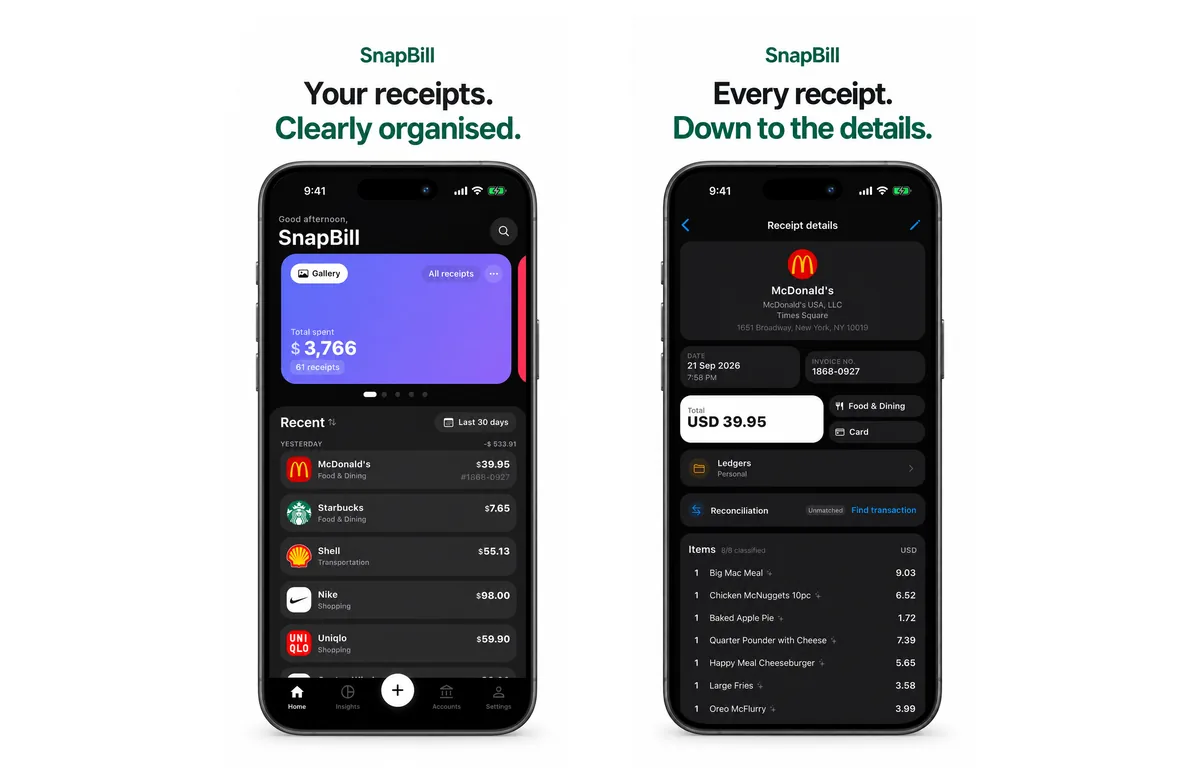
SnapBill reads every line on your receipts, sorts them into categories, and keeps them ready for tax time. Start with 10 free credits on iPhone, Android or the web. Download SnapBill
See every credit pack on our pricing page. For a wider comparison of seven receipt apps, read the best AI receipt scanner apps in 2026.
Quick answers
Is Expensify free?
Partly. A personal Expensify account includes unlimited SmartScans, manual entry, mileage tracking and CSV export for free. Categories, tags, approvals, accounting integrations and the Expensify Card need a paid workspace, from US$5 per member a month.
How much does Expensify cost per month?
Collect is US$5 per member a month. Control is US$36 per active member a month, or US$18 on an annual plan, and as low as US$9 with Expensify Card discounts (prices checked 20 October 2026).
Is there a cheaper alternative to Expensify?
For one person or a small business, yes. SnapBill has no subscription: you get 10 free credits, then buy credit packs (from RM9.90 for 100 scans in Malaysia) that never expire. It does not offer team approvals or a company card.
Does SnapBill have a subscription?
No. SnapBill uses credit packs. A scan uses 1 credit, an export 0.5 credits, and credits you buy never expire.
Can Expensify read line items on a receipt?
Expensify says SmartScan extracts the merchant, date, amount and itemised line items. If you want one receipt recorded as several separate expenses, you split it yourself. SnapBill reads every item and keeps each one as its own line.
Is Expensify good for freelancers?
It can be, especially the free account if you only need scans and a CSV. Its paid features are mostly for teams. Freelancers who want item-level detail and no monthly fee may prefer SnapBill.
Disclaimer: SnapBill is our product. Expensify prices and features were checked on Expensify's own help centre and website on 20 October 2026 and may change; check expensify.com for current pricing. Expensify is a trademark of Expensify, Inc. SnapBill is not affiliated with or endorsed by Expensify.